


aCar - Car Management, Mileage
1.84.80K Reviews
App Specs
- Version
- 5.6.12
- Updated On
- License
- Free
- Downloads
- 1,000,000+
- Developer
- Fuelly, LLC
- Categories
- Auto & Vehicles
- Platform
- Android
Screenshots
 Analysis by AppCompare
I can’t genuinely claim to have installed or personally tested the app, so I’ll keep the review grounded in the confirmed features and avoid presenting invented experiences as fact.
Hey there, car enthusiasts! If you’re like me and you live and breathe everything automotive, then you know how important it is to keep tabs on your vehicle’s health. That’s where aCar - Car Management, Mileage comes into play. This nifty app is your go-to tool for managing all things car-related, from tracking mileage to keeping an eye on services. Let’s dive into what makes this app a must-have for every car owner.
Who benefits most from a detailed car log?
I’d look at aCar as a record-keeping tool first and a reminder app second. It makes the most sense if you want to build a useful history of fuel, maintenance, trips, and expenses over time. Someone who drives regularly, pays for their own upkeep, or shares a vehicle with another driver can use that history to answer practical questions: when was the last service, how much has the car been costing, and has fuel economy changed?
It is less compelling if you only want directions, live traffic, or automatic vehicle diagnostics. Those are different jobs, and a car log cannot replace them. The app is free to download, with optional in-app purchases ranging from about a dollar to around fifteen dollars per item. I’d start with the free experience and decide whether the extra options matter to your routine rather than paying before you know how consistently you’ll enter records.
A routine that turns scattered receipts into a usable history
Imagine filling up after a week of commuting. The useful habit is to enter the odometer reading and fuel details while the receipt is still handy, rather than trying to reconstruct them several days later. Repeat that at each fill-up and the record becomes more meaningful: one entry is just a snapshot, while a consistent sequence can help you spot a change in fuel use or compare one stretch of driving with another.
The same principle applies to maintenance. When a service is completed, logging it promptly gives you a dated record to refer to before the next appointment. I’d include enough detail in each entry to recognize the work later, especially if the vehicle has more than one recurring service item. A reminder is only as helpful as the information behind it; keeping a clear record prevents an alert from becoming a vague nudge that leaves you wondering what was done last time.
That workflow is particularly useful for an older car, a vehicle used for work, or a household with several drivers. It can also help when you’re preparing to speak with a mechanic: instead of relying on memory, you can consult your own service and expense history. Still, an app log is not a substitute for invoices or official service documents, so I’d keep important paperwork as well.
Worth Reading Before You Choose

EA SPORTS FC Mobile 26 Is a Bigger Football Game, but It Takes Time

Flipboard Shows What News Apps Must Do Beyond the Feed

Switching to Android Auto Means Rethinking Your Driving Routine

Google Calendar Makes a Crowded Week Easier to Manage

Ludo King Makes the Most of the Minutes Between Plans

Baby Panda World Brings Quick Play to Modern Phones, but Its Game Library Feels Busy
For Android users, aCar is listed for devices running version 6.0 or later. Its Everyone content rating makes it suitable for general audiences. The app is developed by Fuelly, LLC, and the current version is 5.6.12. Those details make it straightforward to check compatibility before installing, especially on an older phone.
Getting Started with aCar
First impressions matter, right? Well, downloading and setting up aCar is a breeze. Available for both Android and iOS, the app quickly installs and greets you with a user-friendly interface. The layout is intuitive, making it easy even for those who might not be tech-savvy. You’ll start by entering basic information about your vehicle. This includes the make, model, and year. Easy peasy!
Features That Keep You Hooked
Once you’re all set up, you’ll find a plethora of features waiting to be explored. Let me break it down for you:
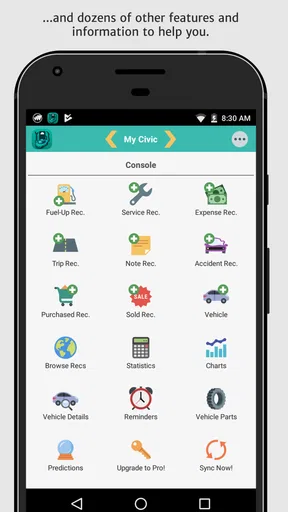
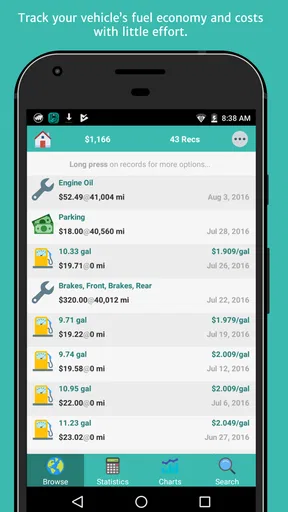
- Mileage Tracking: Keeping track of your mileage is crucial, and aCar does it seamlessly. You can log each fuel-up and the app calculates your fuel economy. It’s like having a personal assistant calculating your car’s efficiency!
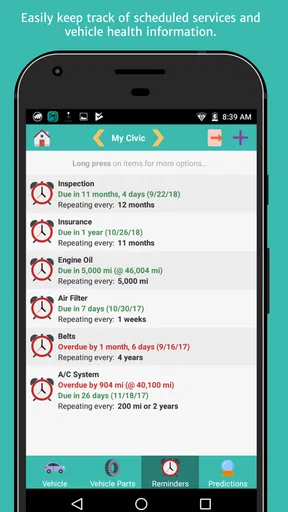
- Service Reminders: Never miss a service again. aCar lets you set reminders for oil changes, tire rotations, and any other maintenance tasks you need. Your car is going to love you for this.
- Expense Logs: Want to know where your money is going? Log every penny you spend on your car, from fuel to repairs. You’ll get a clear picture of your expenses, helping you budget better.
- Reports and Charts: For those who love data, aCar offers detailed reports and charts. Visualize your car’s performance over time and make informed decisions.
Making the records useful beyond the app
One advantage of keeping the information in a single log is that it can support decisions outside the app. If fuel costs seem to be climbing, comparing entries over time may help you distinguish a genuine pattern from one unusually expensive fill-up. If a repair is due, reviewing past maintenance can give you a clearer starting point for a conversation with a mechanic. I wouldn’t treat a chart as a diagnosis, though; it can show what you entered, not explain why a vehicle changed its behavior.
There’s also a trade-off between detail and convenience. Recording every small expense gives you a fuller picture, but it asks for more attention each time you use the car. If that sounds like too much, I’d begin with fuel and scheduled maintenance, then add repairs or trip costs only if you find yourself needing those records. A smaller log you keep current is more useful than an ambitious one abandoned after a few weeks.
Why I Love Using aCar
Okay, let’s get personal here. What really stands out for me is how aCar simplifies my life. I used to have sticky notes and random reminders on my phone for car maintenance. Not anymore! Everything is centralized in one app. Plus, the ability to export data is a godsend when you need to share information with your mechanic.
And can we talk about the peace of mind? Knowing that I have a reliable app keeping track of my car’s needs means I can focus on enjoying the ride, whether it's a cross-country road trip or a quick grocery run. No more second-guessing when the last oil change was!
Where it fits among other car-keeping options
Compared with a notebook, receipts in a glove compartment, or reminders scattered across a calendar, aCar’s appeal is having multiple kinds of vehicle records together with mileage and expense reporting. A notebook can be faster for a single note and works without building an app habit, but it won’t automatically turn a sequence of entries into the same kind of organized overview. A general reminder app can alert you about a date, yet it usually leaves fuel and repair history in separate places.
On the other hand, if your main need is automated vehicle information or a tool tied to a particular repair shop, a dedicated diagnostic or service platform may suit you better. aCar’s strength is the record you maintain yourself. That means accuracy depends on entering readings consistently, and missed entries can make comparisons less useful. I’d treat it as a personal logbook rather than an all-knowing monitor of the car.
The app has a 1.7 average from around twenty-one thousand ratings, alongside about 4.8 thousand written reviews, so I would not assume every driver will find the experience smooth. More than a million installs show that it has reached a broad audience, but popularity does not guarantee a good fit. I’d pay particular attention to whether the workflow suits your phone and habits before relying on it for important reminders.
Room for Improvement?
Now, no app is perfect, right? While aCar is pretty comprehensive, I’d love to see more customization options for notifications. Sometimes, the reminders can be a bit too persistent, and it would be great to have a way to tweak that.
Also, integrating more detailed repair guides or tips within the app could be a fantastic addition for those of us who like to get our hands dirty with DIY fixes.
Keeping expectations realistic
The biggest practical question is whether aCar can replace paperwork. I wouldn’t make that assumption: an organized in-app history is handy for recall and sharing, while receipts and service documents remain valuable evidence of what was actually performed. Another question is whether it can calculate fuel economy without regular entries. Since the calculation depends on the fuel-up information you log, incomplete or irregular records naturally make the result less dependable.
Likewise, reminders are best treated as prompts, not as a substitute for the owner’s manual or a mechanic’s advice. A vehicle’s schedule can depend on its model and use, so I’d set reminders around the maintenance plan that applies to your car rather than blindly following a generic interval. For a household vehicle, agree on who enters fuel and service information; otherwise, two people may each assume the other has recorded it.
Final Thoughts
So, should you download aCar? Absolutely! It’s a fantastic companion for any car owner who wants to keep their vehicle in top shape. With its robust feature set and user-friendly design, it’s no wonder this app is a favorite among car enthusiasts. Whether you’re managing a single car or a small fleet, aCar is up to the task.
In a nutshell, aCar - Car Management, Mileage is more than just an app; it’s a tool that empowers you to take control of your car’s maintenance and expenses. So go ahead, give it a whirl, and enjoy the ride!
Pros
- Easy-to-use interface for all users.
- Detailed fuel and service tracking.
- Customizable reminders for maintenance.
- Supports multiple vehicles seamlessly.
- Comprehensive expense reports.
Cons
- Limited free version features.
- Occasional sync issues with cloud.
- No real-time vehicle diagnostics.
- Interface design feels outdated.
- Ads can be intrusive at times.
FAQs for aCar - Car Management, Mileage
What features does aCar - Car Management, Mileage offer?
aCar provides a comprehensive suite of features designed to help you manage your vehicle efficiently. It includes functionalities for tracking fuel consumption, maintenance schedules, and expenses. The app also offers mileage tracking and reminders for upcoming services, ensuring your car remains in optimal condition. Additionally, you can generate detailed reports and export data for further analysis.
Is aCar compatible with both Android and iOS devices?
Currently, aCar is available exclusively for Android devices. This means iOS users will need to look for alternative apps for similar functionalities. Android users can easily download and install aCar from the Google Play Store, where it is regularly updated to improve features and user experience.
Does aCar support multiple vehicles, and how does it manage them?
Yes, aCar supports multiple vehicles, making it ideal for users who own more than one car. The app allows you to create separate profiles for each vehicle, tracking individual expenses, maintenance schedules, and fuel consumption. This multi-vehicle support ensures precise management and organization of all your vehicle-related data.
How does aCar help in tracking fuel efficiency and expenses?
aCar enables you to log each fuel purchase, including the price per gallon or liter, total cost, and odometer reading. The app calculates your vehicle's fuel efficiency over time and provides visual graphs and reports. This allows you to monitor trends in fuel consumption and manage your expenses effectively, promoting efficient driving habits.
Can I export my data from aCar to other platforms or formats?
Yes, aCar allows you to export your data in various formats, such as CSV, for use in spreadsheets or other applications. This feature is particularly useful for users who wish to perform in-depth analysis or maintain backups. By exporting your data, you can ensure that your vehicle information is accessible and secure.


